Securely Integrating LLMs with Proprietary Data Using MCP
Overview
Large Language Models are extraordinary reasoning engines, but out of the box, they only know what they were trained on. That leaves two critical gaps for enterprise use:
- Knowledge cutoff: the model has no access to anything after its training date
- Proprietary data blindspot: the model knows nothing about your company’s internal systems, databases, or documents
This article walks through how Model Context Protocol (MCP) solves both problems by acting as a governed, secure bridge between an AI agent and your data.
Foundational Concepts
Before jumping into MCP, three concepts are worth establishing clearly.
Large Language Models (LLMs)
An LLM is an AI system trained on massive amounts of text data: web pages, books, code repositories, academic papers, and more. Through that training, LLMs develop the ability to understand and generate language, answer questions, summarize content, and find patterns across large datasets.
Think of an LLM as a skilled research analyst who has read nearly everything ever published, but whose knowledge stopped on a specific date, and who has never seen anything inside your organization.
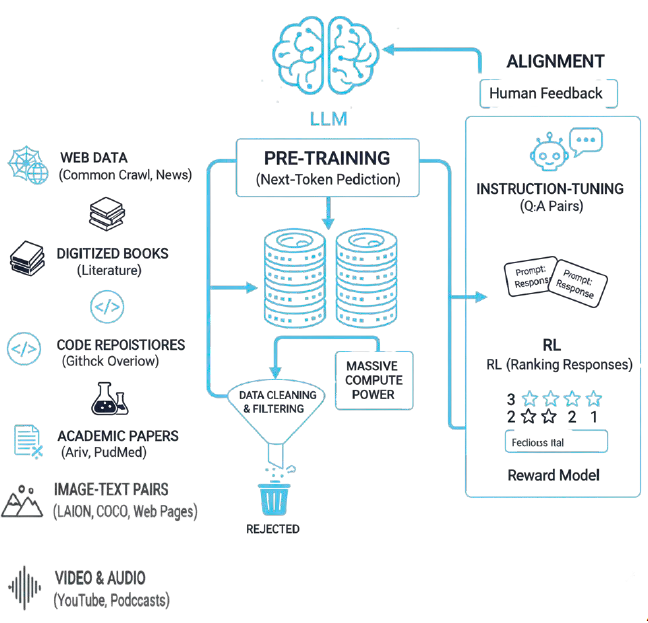
Examples in production today: GPT-4o, Claude Sonnet 4, Llama 3, Gemini 1.5.
Intelligent Agents
An Intelligent Agent is an autonomous software program that uses an LLM as its reasoning core to perform complex, multi-step tasks. The agent decides what tools to invoke, in what order, and how to synthesize results into a coherent answer.
A concrete enterprise example: a financial agent that pulls live stock prices from a market data API, cross-references your firm’s internal risk parameters, and generates trade recommendations, all in a single natural-language query.
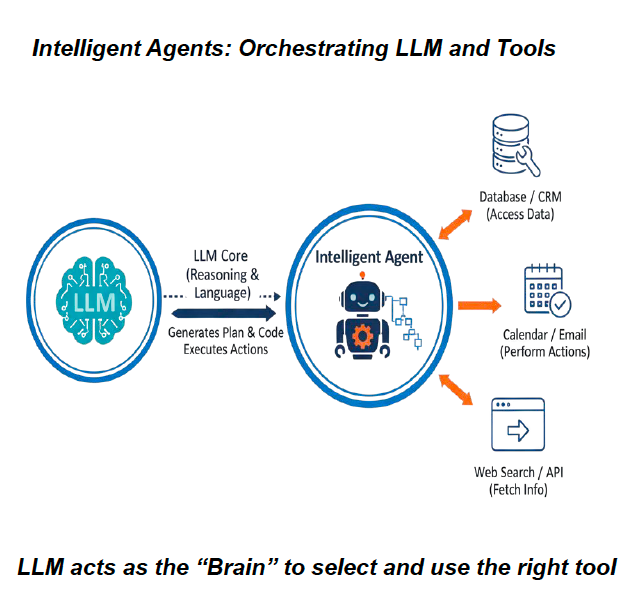
The key insight: the LLM acts as the brain: it doesn’t store data, it reasons over data that tools retrieve.
Retrieval Augmented Generation (RAG)
RAG is the technique that gives LLMs access to up-to-date or proprietary information they were never trained on. Rather than relying solely on its training weights, the model retrieves relevant context at query time, then generates its answer grounded in that retrieved data.
RAG solves the two gaps described above:
- Knowledge cutoff: retrieve current information (today’s news, live prices, recent records) before generating a response
- Proprietary access: retrieve from your internal systems (CRM, databases, documents) rather than the public internet
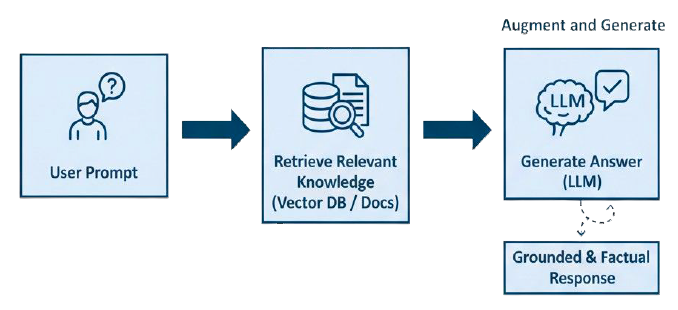
A practical illustration: a user asks “Is it a good time to hike in Iselin, NJ?” The agent fetches the current weather (RAG retrieval), passes that to the LLM alongside the original question, and gets back a grounded, accurate answer, not a hallucinated one.
Model Context Protocol (MCP)
What MCP Is
MCP is an open standard protocol created by Anthropic (open-sourced November 2024) that defines how AI agents interact with external tools, data sources, and services in a governed, secure way.
While RAG is a specific technique for augmenting knowledge, MCP is the broader infrastructure layer: it standardizes how agents discover capabilities, invoke tools, and receive results.
The analogy that resonates most: MCP is the USB-C port for AI. Just as USB-C lets any device connect to any peripheral through a standard interface, MCP lets any AI agent connect to any compatible data source or tool through a standard protocol.
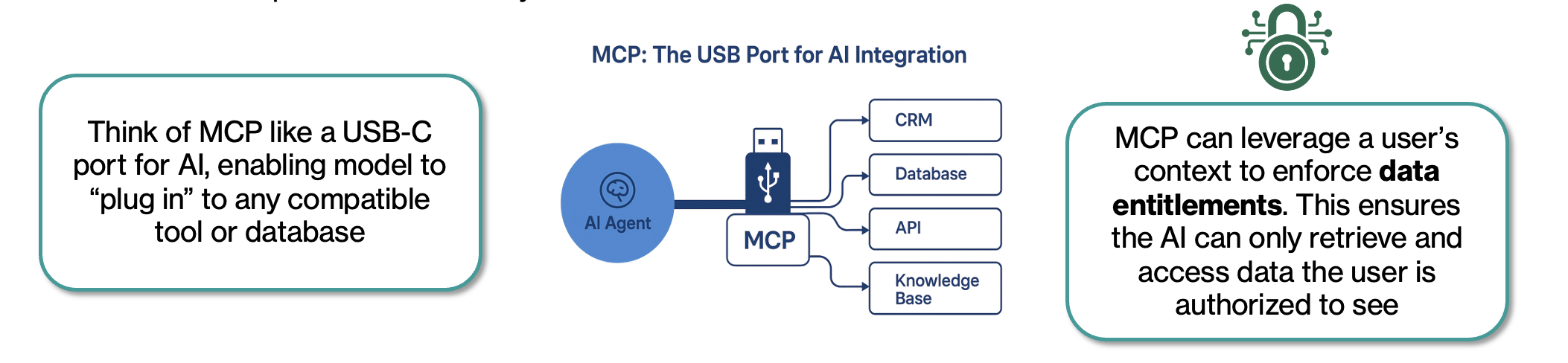
Three key properties make MCP valuable for enterprise:
- Self-describing: MCP servers advertise their capabilities to the agent at runtime. When you update a backend system, the agent automatically discovers the new capabilities, no re-training, no manual integration changes.
- Context-aware security: MCP can use the caller’s identity to enforce data entitlements. The AI retrieves only data the requesting user is authorized to see.
- Standardized: one integration pattern works across all major AI platforms: OpenAI, Google DeepMind, Microsoft Azure, AWS Bedrock, Amazon Q, GitHub Copilot, and more.
Before and After MCP
Before MCP, every AI model required a custom integration with every external data source. Ten models talking to five data sources meant 50 custom integrations, a “spaghetti architecture” that was expensive, inconsistent, and hard to secure.
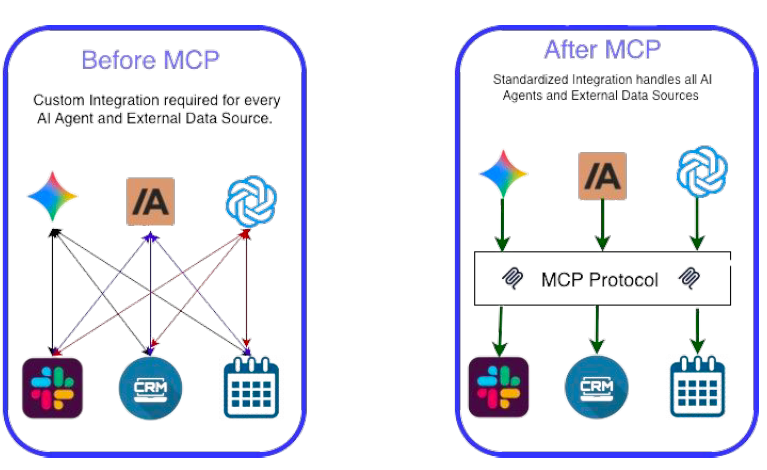
After MCP, you build the integration once to the MCP standard, and any compliant AI agent can use it securely.
Adoption at Scale
MCP’s adoption curve has been steep:
| Signal | Detail |
|---|---|
| Creator | Anthropic, open-sourced November 2024 |
| Governance | Open-source steering group |
| Major adopters | OpenAI, Google DeepMind, Microsoft Azure, AWS (Bedrock + Amazon Q), Cloudflare, GitHub, Slack |
| SDK languages | Python, TypeScript, Java, C#, Go, Rust (8+ total) |
| Servers available | ~16,000 unique MCP servers on public marketplaces |
| Enterprise savings | Block (Square) reports 50-75% time reduction on common engineering tasks |
| 2026 forecast | 75% of API Gateway vendors and 50% of iPaaS vendors expected to include native MCP |
How the Components Interact
The interaction model has four layers:
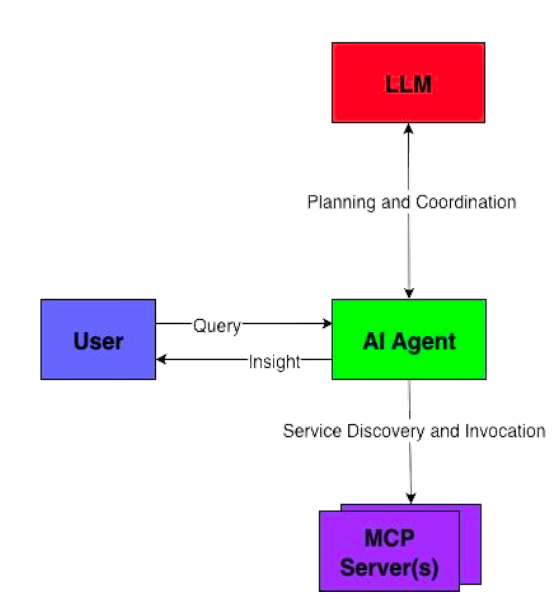
- User submits a natural-language query
- AI Agent (e.g., Claude Desktop) receives the query, routes to the LLM for planning
- LLM determines which tools are needed and in what sequence
- MCP Servers handle service discovery and invocation against the actual data sources
- The Agent synthesizes all retrieved context into a coherent, grounded response
Real-World Demo: LLM + Proprietary Sales Data
This demo shows the architecture in action, combining LLM analytical capabilities with real-time sales data and proprietary product documents to generate business insights.
Architecture
The demo uses two MCP servers and Claude Desktop as the AI agent:
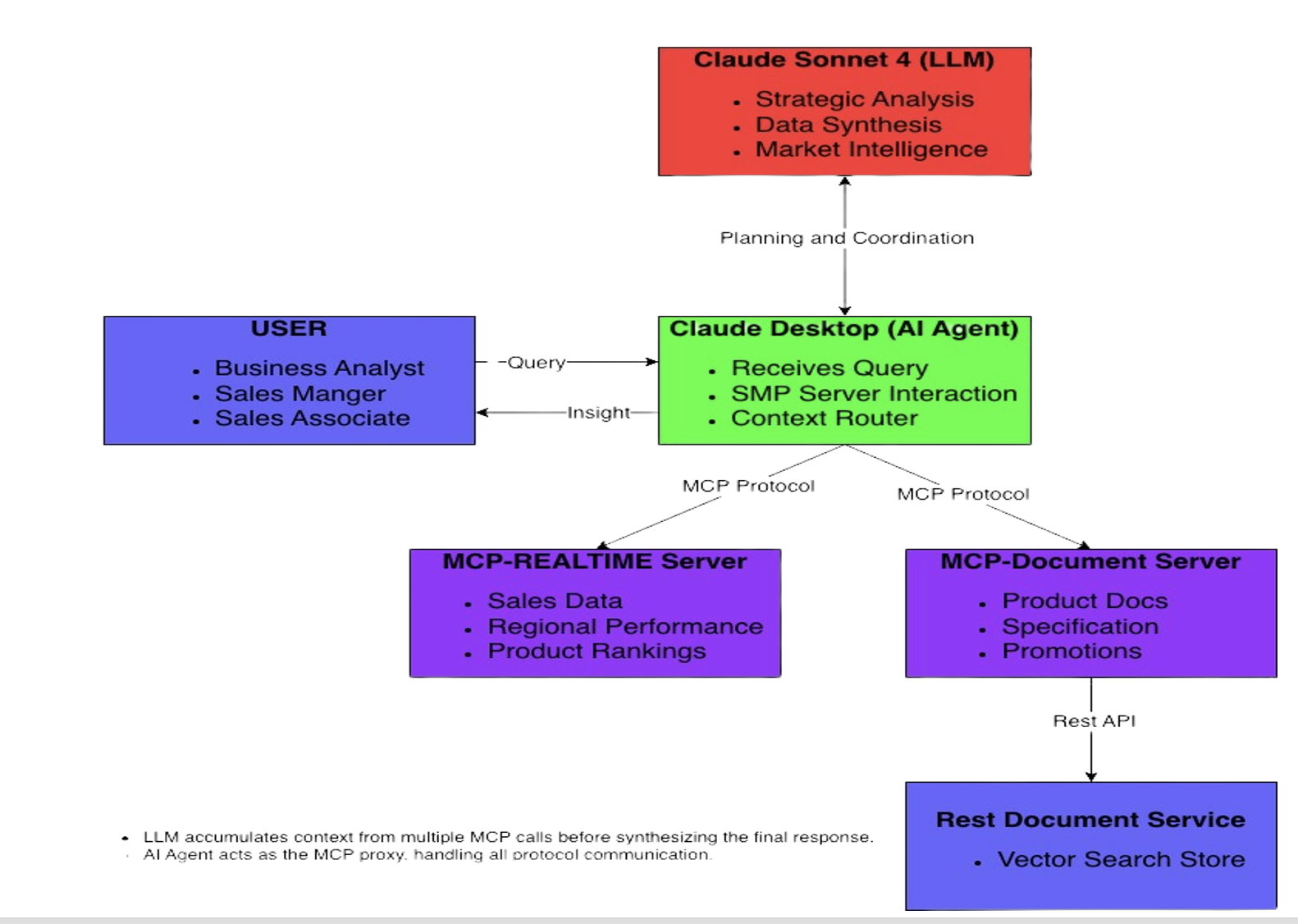
| Component | Role |
|---|---|
| Claude Sonnet 4 (LLM) | Strategic analysis, data synthesis, market intelligence |
| Claude Desktop (AI Agent) | Receives queries, routes MCP calls, assembles context |
| MCP-Realtime Server | Serves live sales data, regional performance, product rankings |
| MCP-Document Server | Retrieves product specs, promotions, warranties via semantic search |
| REST RAG Service | Vector search store backing the document server |
A critical design point: the LLM accumulates context from multiple MCP calls before synthesizing the final response. The agent acts as the MCP proxy: it handles all protocol communication and assembles the full context before the LLM reasons over it. No proprietary data is sent to the LLM until the agent has retrieved exactly what’s needed.
Hands-on Setup Instructions
All demo code is on GitHub. To prove this works, let’s wire it up locally. You’ll need Node.js installed.
Step 1: Clone and Run the Three Services
# To run the demo, you will need to start three separate services.
# It is recommended to open three separate terminal windows.

# --- Terminal 1: MCP Realtime Server ---
git clone https://github.com/AsifRajwani/MCP-Server
cd MCP-Server
npm install
npm start

# --- Terminal 2: MCP RAG Bridge Server ---
git clone https://github.com/AsifRajwani/MCP-RAG-Bridge
cd MCP-RAG-Bridge
npm install
npm start

# --- Terminal 3: REST RAG Service ---
git clone https://github.com/AsifRajwani/RAG-service
cd RAG-service
npm install
npm start
Follow the README.md in each repo for environment variables and any dependencies.
Step 2: Install Claude Desktop
Download Claude Desktop for your OS from claude.ai/download.
Step 3: Configure MCP Servers Properly
Open Claude Desktop → Developer menu → Edit Config. This opens the claude_desktop_config.json file. Provide the absolute paths to where you cloned the repositories:
{
  "mcpServers": {
    "MCP-Realtime": {
      "command": "node",
      "args": ["/absolute/path/to/MCP-Server/mcp-server.js"]
    },
    "MCP-RAG": {
      "command": "node",
      "args": ["/absolute/path/to/MCP-RAG-Bridge/rag-mcp-bridge.js"]
    }
  }
}
Step 4: Authorize the Servers
- Navigate to the Developer menu → verify both servers appear gracefully in the list without connection errors.
- Go to the Connectors menu → for each server, carefully review the available tools, and set methods to “Allow unsupervised” for the scope of this local tech demo.
- Restart Claude Desktop.
Step 5: Verify the Integration (The “Hello World” query)
Run this prompt in Claude Desktop’s chat interface:
“How does our UltraBook Pro 15 compare to market competitors, and should we adjust our pricing strategy based on our current sales performance?”
Step 6: Troubleshooting & Security Verification
If you want to look under the hood with a security mindset:
- Tail the Logs: Open a separate terminal and run
tail -fon yourMCP-Serverconsole output. You will explicitly see Claude Desktop sending JSON-RPC queries to invoke your exposed tools. - Review Intercepts: Watch how Claude requests the tool, waits for the response, and uses the returned JSON without ever accessing your root directory or unrestricted database schemas.
Demo Scenarios
These five prompts showcase distinct integration patterns, combining the capabilities of the real-time servers against the LLM’s vast general knowledge.
1. Product Bundle Analysis
“Our top-selling product is generating great revenue, but I want to make sure we’re maximizing its potential. Analyze our best performer against our available accessories and tell me what bundles we should create.”
| Component | What This Shows |
|---|---|
| MCP Real Time | Pulls top products by revenue |
| MCP Document | Searches accessories documentation |
| LLM Value-Add | Correlates sales performance with product ecosystem, identifies bundle opportunities, calculates revenue potential |
2. Regional Strategy Optimization
“Which region should I prioritize for our Q4 push, and what specific promotions from our catalog would work best there?”
| Component | What This Shows |
|---|---|
| MCP Real Time | Regional sales distribution data |
| MCP Document | Current promotional strategies and campaigns |
| LLM Value-Add | Regional performance analysis, promotion-to-performance matching, strategic recommendations |
3. Product Performance Gap Analysis
“I notice our wireless mouse sales are low despite being featured in promotions. Help me understand why and what we should do about it.”
| Component | What This Shows |
|---|---|
| MCP Real Time | Specific product performance metrics |
| MCP Document | Product specifications and promotional details |
| LLM Value-Add | Gap analysis between marketing and performance, product positioning insights, competitive assessment |
4. Seasonal Strategy Development
“Based on our current sales and available promotions, create a holiday shopping strategy that maximizes our revenue potential.”
| Component | What This Shows |
|---|---|
| MCP Real Time | Current product performance baseline |
| MCP Document | Holiday promotions and bundle documentation |
| LLM Value-Add | Market timing insights, cross-selling strategies, revenue projection modeling |
5. Competitive Positioning Analysis
“How does our UltraBook Pro 15 compare to market competitors, and should we adjust our pricing strategy based on our current sales performance?”
| Component | What This Shows |
|---|---|
| MCP Real Time | Actual sales performance data |
| MCP Document | Product specifications and features |
| LLM Value-Add | Market research integration, competitive analysis, pricing strategy recommendations |
Key Takeaways
MCP is not hype: it is infrastructure. The shift it enables is from AI as a standalone chatbot to AI as a reasoning layer that operates securely over your actual systems and data.
For enterprise teams evaluating this pattern, three things matter most:
- The security model is sound: data stays inside your perimeter; only inference-time context crosses the boundary; entitlements are strictly enforced at the MCP layer.
- The integration is standardized: build once to the MCP protocol, and it works with every major AI platform today and the platforms that will exist in 2026.
- The productivity gains are real: early enterprise adopters are reporting 50-75% reduction in integration and context management work.
The combination of LLM reasoning over proprietary real-time data is genuinely powerful. The demo above is a minimal version of what’s possible. The same architecture applies to financial analysis, customer support, engineering diagnostics, regulatory compliance, and any domain where your proprietary data is the differentiator.
Demo source code: MCP-Server · MCP-RAG-Bridge · RAG-service