From Frustration to Workflow: AI-Assisted Development for Real Applications
Lessons from building a privacy-focused PDF toolkit: from my failed first attempt to a repeatable workflow.
Overview
A few months ago, I tried to build a complex application using AI and failed. Not because the tools were bad, but because I was using them wrong. I treated AI as a faster typist when what I needed was a development workflow built around AI’s strengths and weaknesses.
This article is about what I learned. I built a production PDF toolkit (15+ utilities handling sensitive documents, processing everything client-side for privacy) in about 4 weeks of part-time work. The same app would have taken me roughly a year without AI. More importantly, the quality is better than what I would have produced.
Here is the workflow that got me there, the real bugs it caught, and what I would tell someone starting this journey today.
A quick caveat: this workflow is not for everything. Weekend hackathons, prototypes, personal tools: a lighter approach is fine. This level of rigor is for when you are shipping to real users who need to trust your application with their data. Know which mode you are in.
The Application
PDF Utilities is a privacy-focused PDF toolkit. It handles operations like merging, splitting, redacting, signing, watermarking, compressing, and more. Nearly all processing happens in the browser, with a server-side fallback only for certain image formats that the browser cannot handle natively. In all cases, files are processed strictly in-memory and never stored.
That architectural decision to use client-side processing by default drove much of the complexity. It required deep work with WebWorkers, OffscreenCanvas, in-memory PDF manipulation, and client-side cryptography. These are domains where getting it wrong means data leaks, browser crashes, or silently corrupted documents. Stability, security, and usable UX were non-negotiable.
The Journey
I started where most people start: using AI as a more sophisticated code completion tool. Write a function signature, let AI fill in the body. Generate some boilerplate. It worked fine for that.
Then I tried to build a full application using AI. Simple apps went well. When I attempted something with real complexity (multiple interacting features, sensitive data handling, interaction-heavy UI), it fell apart. The AI would drift between frameworks, generate inconsistent patterns across files, and produce code that looked correct but broke in subtle ways. I spent a week going in circles, frustrated.
I could have concluded that AI was not ready for serious development. Instead, I stepped back and invested a couple of weeks in structured learning: courses on AI-assisted development workflows, agentic coding patterns, and prompt engineering for code generation. The difference was not in the AI tools. It was in how I approached the work.
The Workflow That Actually Works
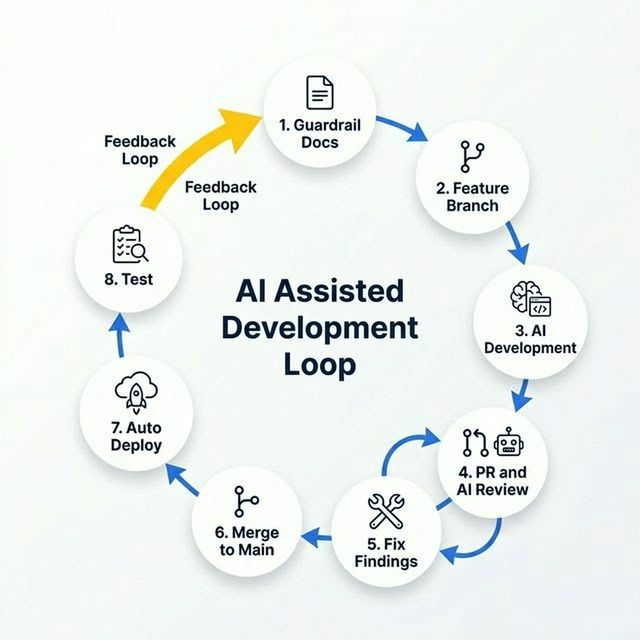
Figure: The development cycle: guardrails first, incremental features, automated review, continuous deployment. I updated docs after each feature to keep AI aligned.
1. Write the Guardrails First
Before writing any code, I wrote three documents: a technical spec (stack, libraries, architectural constraints), business requirements (features, limits, security rules), and UX guidelines (component library, layout patterns, typography).
This is the single most important step. Without these, AI drifts. Early on, I had not specified that all UI must use shadcn/ui components, and the AI started generating custom UI. I had not specified that all server actions must use typed parameters, and the AI used raw FormData. Once I added these constraints to the tech spec, the problems disappeared.
These documents do not need to be long or bureaucratic. Simple, short documents with clear rules act as the GPS that keeps the AI on course. If I could do one thing differently, it would be writing a tighter spec from day one, as every instance of AI drift I encountered was a direct result of missing constraints in the guardrails.
2. Break the Work into Independently Testable Steps
I broke the full application into 25 steps and tracked them in a plan.md file. Each step contained just enough detail to outline the goal without over-specifying. I could build, test, and deploy each step as a complete feature on its own. The workflow was straightforward: prompt the AI to implement the next step from plan.md, test it, and mark it complete. If the AI was unsure about an implementation detail, it would ask me a clarifying question before proceeding (a pattern I discuss in 4. Structured Feature Development). AI performs dramatically better when you give it a focused, well-scoped task rather than asking it to build large, interconnected features at once.
3. Use Multiple AIs to Validate Each Other
I developed each step with a different AI assistant and used the others to review the output. This created an independent review panel, as each AI has different training data and different biases. When two AIs disagree on an approach, that disagreement is a signal worth investigating.
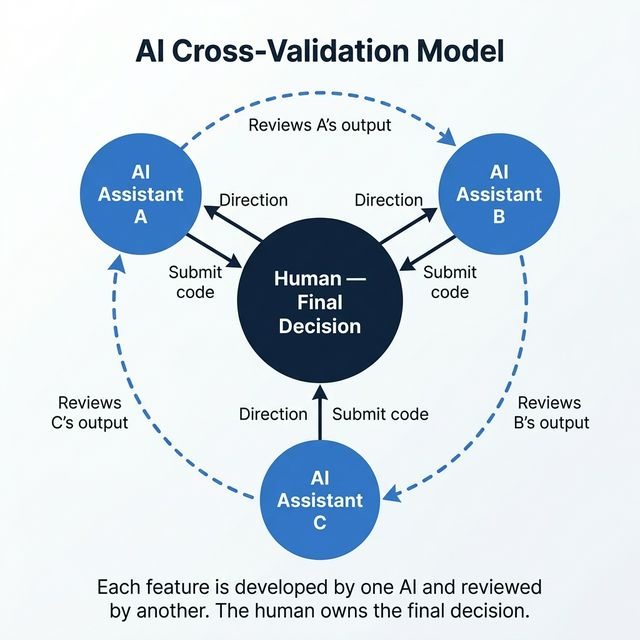
Figure: Each feature is developed by one AI and reviewed by another. The human owns the final decision.
This approach was one of the most valuable parts of my workflow. I do not have a strong preference for one AI over another at this point. Each has strengths, and the real value comes from the cross-validation, not from any single tool.
4. Structured Feature Development
Rather than broadly prompting the AI with “build me a PDF splitter,” I instructed it to implement the next step from my plan.md using a strict flow: codebase exploration, identifying requirements, asking clarifying questions, designing the architecture, implementation, testing, and validation.
The clarifying questions phase was a game changer. Instead of the AI guessing which path to take (and guessing wrong), it asked me to choose. That single pattern eliminated most of the “AI went off the rails” moments.
Critically, this flow includes generating unit and end-to-end tests as part of every feature, not as an afterthought. The AI must also update existing tests to align with the changes. As the application grows, these tests become your safety net. Without them, a change in one feature silently breaks another, and you only find out after deployment.
5. PR Review with AI
I developed every feature on a feature branch. I routed every merge to main through a pull request that the AI reviewed using defined criteria. I addressed all findings and requested another review. This cycle continued until the PR was clean.
This is where the real value showed up. Across 40+ pull requests, AI review caught dozens of issues I would have missed or deprioritized as a solo developer.
6. Automated Build and Deploy
Every merge to main deployed automatically. No manual builds, no manual uploads. Platforms like Vercel, AWS Amplify, and Netlify make this trivial to set up. The principle matters more than the tool: your feedback loop speed determines your development speed. When you can test real behavior within minutes of writing code, incremental development actually works.
7. Update the Docs
After each feature, I requested the AI to update the guardrail documents if anything changed: new patterns established, new constraints discovered, or scope adjustments. This keeps the AI aligned for the next feature. Without this step, context drift creeps back in.
What AI Review Actually Catches
The abstract argument for code review is easy to make. Here is what it looked like in practice:
- Security vulnerabilities in “simple” APIs: Overly permissive CORS policies allowed unneeded methods globally. AI review flagged the risk immediately.
- Subtle state bugs: A stale closure in
useCallbackcaused the signature dragging flow to silently fail. The code compiled and worked for the basic path, but broke under specific interactions. - Hidden inconsistencies: The watermark preview and the background processing worker used different coordinate systems and font constraints. The AI caught both the logic duplication and the mismatch in a single pass.
- Client-side denial-of-service (DoS) vectors: The PDF page range parser iterated user input without checking bounds, allowing an input like “1-100000” to hang the browser.
What these bugs share: the AI generated them with full confidence. Code that compiles cleanly can still be wrong in ways that only surface during review or testing. These are the kinds of issues that ship to production every day without rigorous review.
The Results
AI compressed the learning curve on unfamiliar domains (WebWorkers, OffscreenCanvas, browser memory management) and handled the volume of implementation work while I focused on architecture, security decisions, and UX quality. This multi-layered review process ensured a level of quality and security that would have been difficult to achieve as a solo developer.
Advice for Getting Started
Invest in structured learning first. I tried to skip this step and wasted a week. A couple of weeks learning AI-assisted development workflows, agentic coding patterns, and effective prompting saved me far more time than it cost.
Then, build something real. Once you learn the basics, spending more time on tutorials, videos, and articles will not help. Pick an application of genuine complexity, something you would actually use, and build it. That is where the real learning happens.
Ignore the shiny object syndrome. The AI tooling landscape changes daily, making it easy to get distracted by the newest framework or model. Do not get paralyzed trying to pick the “perfect” stack. Focus on learning the fundamental workflows and applying them to a real application first. Once you understand the core patterns, adapting to new tools is easy.
Pick the most capable model your budget allows. When in doubt, use the most intelligent model available. You will get better results faster and save time and money in the long run.
Start new contexts frequently. Do not maintain very long contexts. With enough docs in place and referenced properly by the Agent, the AI will not go off the rails.
The tools will keep changing. The workflow is what compounds. Start with guardrails, work incrementally, review everything, and let AI handle the volume while you own the decisions.